Doretta: The Sweet Handwritten Font for Handmade Brands
When you are building a brand identity for your handmade shop, every visual detail matters. You spend hours perfecting your product photography, selecting the right packaging materials, and curating your color palette. But often, the element that ties everything together—the one that tells customers exactly who you are—is typography. For many crafters and small business owners, finding a font that balances charm with commercial viability can be a challenge. Enter Doretta, a sweet and flowing handwritten font from Script Amp that has quickly become a favorite in my design workflow.
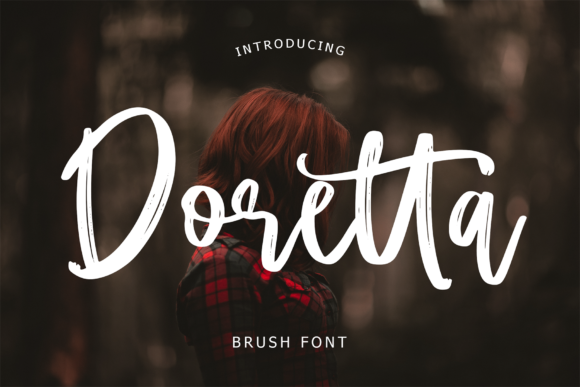
Doretta isn’t just another generic script; it is a typeface created with the help of a brush pen, giving it an organic, authentic feel that resonates deeply with today’s market. Whether you are designing wedding invitations, creating product labels for candles, or crafting digital downloads for planners, Doretta offers a versatile style that feels both personal and polished. In this guide, we will explore how this creative font can elevate your physical products, enhance your digital presence, and help you build a cohesive brand identity.
Why Doretta Stands Out for Crafters and Sellers
The modern consumer craves authenticity. They want to feel connected to the maker behind the product. A stiff, corporate sans-serif font might look clean, but it rarely conveys warmth. Conversely, some overly ornate scripts can be difficult to read or feel dated. Doretta hits the "sweet spot" in between. Its brush-pen origin gives it a natural rhythm and slight variation in stroke width that mimics real handwriting without sacrificing legibility.
For Etsy sellers and boutique owners, this readability is crucial. When a customer sees your logo on a tote bag or reads a tag attached to a piece of jewelry, they need to process the information instantly. Doretta’s flowing lines invite the eye to linger, creating an emotional connection before the customer even touches the product. It adds a layer of perceived quality to your items, suggesting that care and attention were put into every aspect of your business, from the stitching to the signage.
Practical Applications for Physical Products
One of the most common questions I get from fellow makers is, "Where should I use this font?" The answer is almost everywhere your brand appears. Because Doretta is a display font designed for impact, it shines brightest when used for short phrases, names, titles, and decorative wording.
Labels, Tags, and Packaging
If you sell tangible goods, your packaging is your first impression. Doretta is exceptional for:
- Candle and Soap Labels: Pair the elegant curves of Doretta with minimalist line art for a high-end aesthetic. It works beautifully for listing scent notes or brand names on jar labels.
- Boutique Hang Tags: Use it for "Thank You" messages or size indicators. The handwritten feel makes the tag feel like a personal note from the maker rather than a mass-produced label.
- Stickers: For vinyl stickers used on laptops or water bottles, Doretta’s bold yet soft strokes cut cleanly on cutting machines like Cricut or Silhouette, ensuring crisp edges even at smaller sizes.
Invitations and Stationery
As mentioned in its description, Doretta is perfect for gorgeous wedding invitations. However, its utility extends beyond weddings. It is ideal for:
- Birthday Invites: Create a playful yet sophisticated vibe for milestone birthdays.
- Event Welcome Boards: Large-format prints of Doretta look stunning on foam board or acrylic for bridal showers and baby showers.
- Greeting Cards: Use it for the main message on the front of the card, leaving space for a handwritten-style interior note.
Home Decor and Signs
Farmhouse and boho decor trends rely heavily on typography. Doretta brings a softness that complements rustic wood signs or metal wall art. It is particularly effective for seasonal designs, such as "Welcome" signs for spring or festive greetings for the holidays, where you want to convey warmth and hospitality.
Digital Products and Printables
If your business model includes digital downloads, Doretta is equally valuable. Digital planners, journal covers, and social media templates benefit from fonts that stand out in a thumbnail view. When potential buyers scroll through Pinterest or Etsy, a clear, attractive headline can make the difference between a click and a scroll-by.
Create printable wall art featuring inspirational quotes using Doretta for the key words. The font’s versatility allows it to serve as a focal point in mixed-media designs. Additionally, if you offer SVG files for sublimation or vinyl cutting, Doretta’s vector-friendly structure ensures that your designs remain sharp whether scaled up for a banner or down for a mug decal.
Font Pairing Strategies
To maximize the impact of Doretta, it is essential to pair it correctly. A common mistake among beginners is overloading a design with too many competing typefaces. Here are two reliable pairing strategies:
- Doretta + Clean Sans Serif: This is the safest and most modern combination. Use Doretta for the headline or brand name and a simple sans serif font (like Helvetica, Montserrat, or Lato) for body text, dates, or addresses. The contrast between the expressive script and the neutral sans serif creates a balanced, professional look.
- Doretta + Simple Serif: For a more classic or literary feel, pair Doretta with a light serif font. This works exceptionally well for book-related printables, tea company branding, or vintage-inspired stationery.
Avoid pairing Doretta with other busy scripts or highly decorative fonts. Let Doretta be the star of the show. If you need emphasis, use weight variations within the same font family rather than switching typefaces entirely.
Technical Considerations for Makers
Before purchasing or downloading Doretta, take a moment to review the included styles. Check for alternates, ligatures, and swashes. These features add character and allow you to customize text without needing to manually edit paths in Illustrator. For example, if you are spelling out a name, specific letter alternates can improve the flow and prevent awkward spacing.
Also, verify the file formats. Most professional designers prefer OTF or TTF files for compatibility with Adobe Creative Cloud, Affinity Designer, and CorelDRAW. If you are using Canva or other web-based tools, ensure the font is available in those platforms or that you have the rights to upload custom fonts.
Multilingual support is another practical factor. If your brand targets an international audience or uses special characters (like accents in French or Spanish), check the language support list. This saves time and prevents broken characters in your final designs.
Commercial Licensing and Best Practices
As a seller, understanding licensing is non-negotiable. While Doretta is a premium font, it typically comes with a commercial license that allows you to use it in physical products you sell, such as printed shirts, mugs, and packaged goods. However, always read the End User License Agreement (EULA) carefully.
Some licenses restrict the number of physical items you can produce, while others may require a separate extended license for digital resale (e.g., selling the font file itself or uneditable template bundles). For client work, such as designing a logo for a bakery, ensure your license covers third-party usage. Proper licensing protects your business from legal issues and ensures you are supporting the designers who create these beautiful assets.
In summary, Doretta is more than just a pretty font; it is a strategic tool for any crafter or small business owner looking to enhance their brand’s appeal. Its blend of sweetness, flow, and readability makes it suitable for a wide range of applications, from intimate wedding details to bold retail signage. By integrating Doretta into your design repertoire, you are investing in a typeface that speaks directly to your customers’ desire for authenticity and beauty.